UX Case Study

Helping airport travellers never feel lost again

AirWise combines flight status, indoor navigation, and airport assistance into one app. It gives travellers step-by-step departure guidance and real-time flight tracking.

Your airport. Sorted.
Get Started
The Problem

Most airport anxiety is a design problem, not a traveller problem

Most travellers arrive 2 hours early out of fear. They ask staff for directions multiple times. When flights get delayed, they stand around with no idea what happens next.

01

Navigating is guesswork

Travellers stop multiple times to reconfirm directions. Wrong turns at unfamiliar terminals cost time and add anxiety.
02

Delays leave people stranded

A delayed flight and no guidance. Travellers don't know where to wait, what to do, or who to talk to.

03

Peak hours are chaotic

Long queues and overwhelmed counters during holidays push solo travellers toward self-serve options that don't exist yet.

My Role

Solo UX Designer, end to end

Timeline

4 weeks, May to July 2023

Tools

Figma, Slack

Methods

Interviews, Personas, User Flows, Prototyping, Usability Testing

My Approach

5 interviews uncovered 3 distinct traveller mindsets

A 4-week human-centred design sprint. Each week had one clear focus.

"I always arrive 2 hours early because I'm scared of going the wrong way."
Frequent traveller, mother of 2
"When my flight was delayed, I had no idea what to do or where to wait."
First-time international traveller
"I'd rather use an app than stand in a queue during peak hours."
Solo frequent flyer
01
Discover
5 empathy interviews with frequent flyers, families, and first-time travellers. Competitive analysis of existing airport apps.
02
Interpret
Built 2 personas. Mapped information architecture and key user flows for directions and flight status.
03
Ideate
Paper sketches turned into low-fidelity wireframes. Structure and navigation locked before visual design.
04
Prototype
High-fidelity interactive prototype in Figma. Usability tested with real users and refined on feedback.
The Challenge

The hard part was designing for all three user types at once

Designing for everyone, not the tech-savvy

My three interview participants wanted entirely different things. The mother needed kids' facilities. The solo traveller wanted to skip queues. The first-timer needed someone to tell them what to do next.

The fix

Onboarding asks three things upfront: language, mobility needs, and traveller type. Each answer shapes what the app surfaces first.

Offline mode was non-negotiable

Airport Wi-Fi is unreliable. If the app fails when someone is lost at Gate D31, it's useless. Offline support was a non-negotiable constraint.

The fix

Offline map downloads added to the Directions feature. Travellers cache the airport layout before arriving. I tested this specifically in usability sessions.
The Solution

Each screen solves one real problem travellers told me about

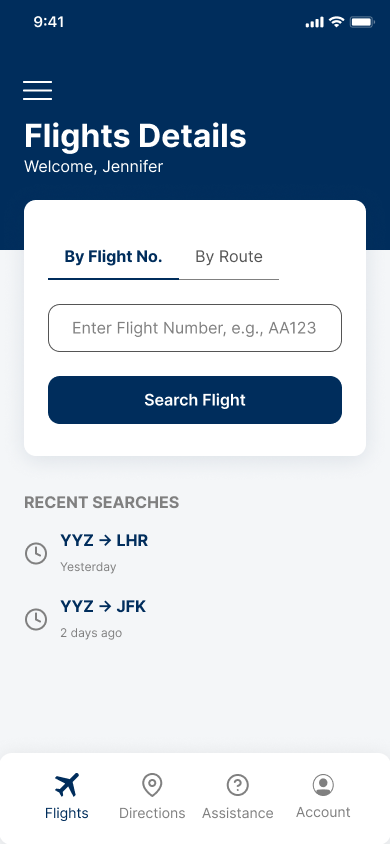
Airwise Flight Search Screen
Screen 01
Flight Search
Search by flight number or route. Recent searches save time for repeat travellers.
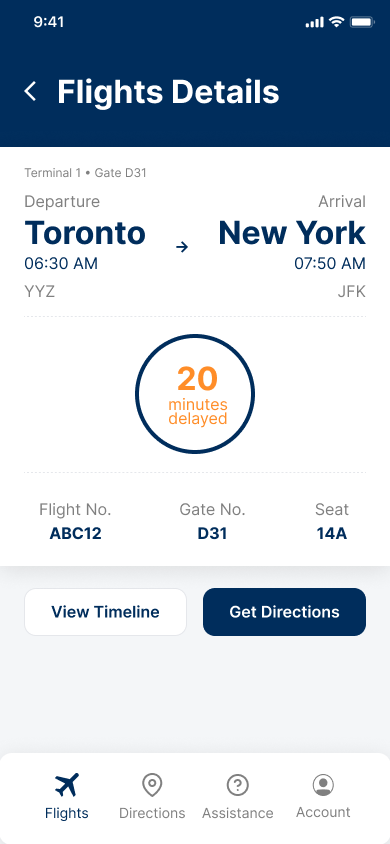
Airwise Flight Status Screen
Screen 02
Flight Status
Delay shown prominently in amber. Gate, seat, and terminal visible at a glance.
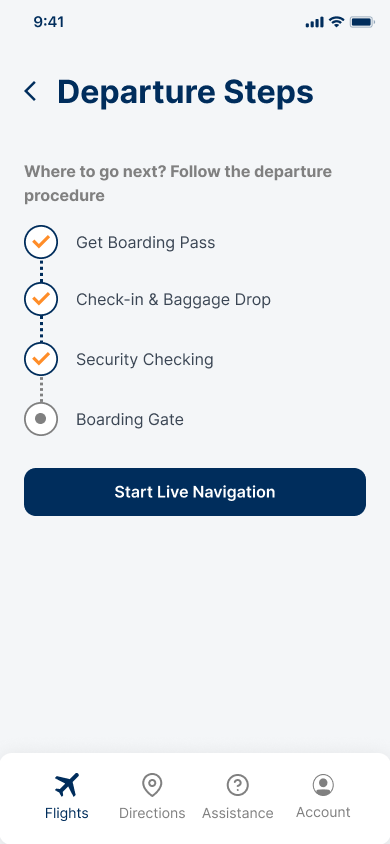
Airwise Departure Steps Screen
Screen 03
Departure Steps
Guided checklist reduces anxiety. Orange checkmarks show progress. Next step always clear.
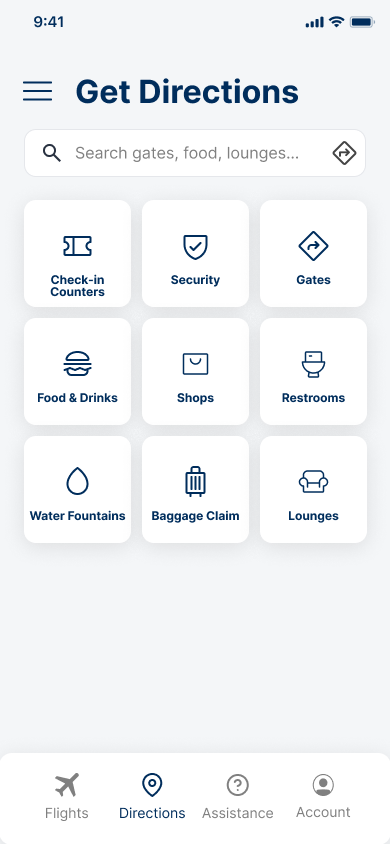
Airwise Get Directions Screen
Screen 04
Get Directions
9 POI categories. Search bar for quick access. 3x3 grid is scannable at a glance.
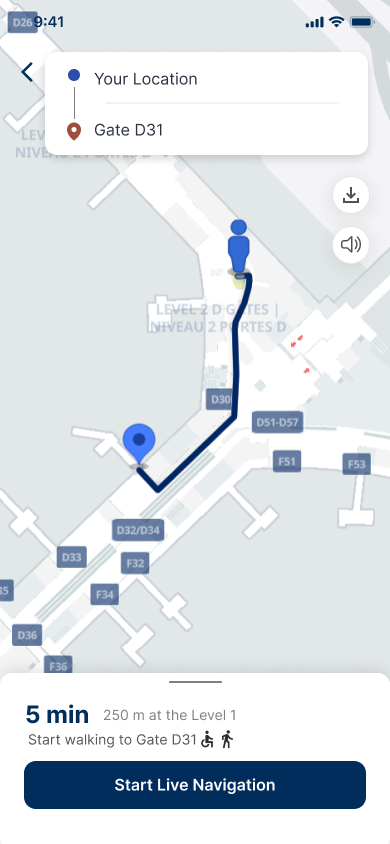
Airwise Live Navigation Screen
Screen 05
Live Navigation
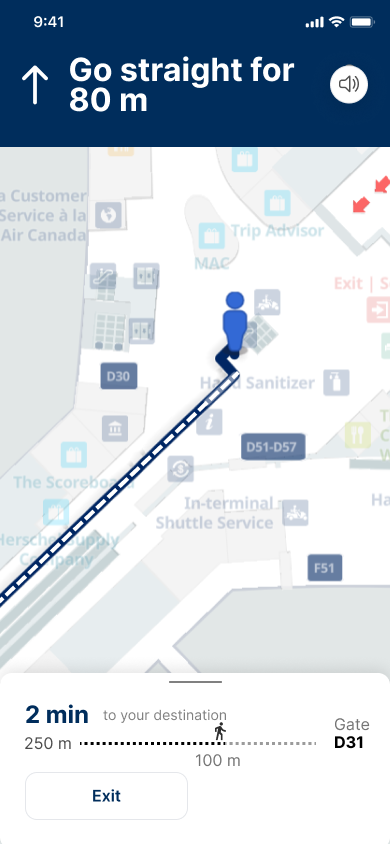
Indoor map with route overlay. Distance, ETA, and accessibility options visible before starting.
Airwise Turn-by-turn Screen
Screen 06
Turn-by-turn
Active navigation with progress bar. Dark header keeps focus on the instruction.
The Impact

Travellers used to juggle 4 separate tools for one trip

AirWise consolidated all of them into one interface.

Before
Multiple tools, fragmented
With AirWise
One app, everything connected
Flight Status
Separate airline app
Real-time alerts in-app
Navigation
Google Maps, breaks indoors
Indoor wayfinding + offline maps
Gate Changes
SMS alerts, often late
Push notification, auto-rerouted
Departure Steps
Guesswork
Guided checklist, personalised
Language Support
None at most airports
8 languages at onboarding
Accessibility
Unavailable
Wheelchair paths surfaced
Results

Tested with 5 real travellers, scored 4.2 out of 5

First-time testers. No briefing. No walkthrough. Still a 4.2/5.
Usability Testing, Round 1

What tested well

Every tester flagged offline maps as a feature they'd actually use
Language selection had zero drop-off. Users got it immediately.
First-time flyers said the departure checklist was the feature they didn't know they needed
Non-English testers said the language screen made the app feel built for them
Next Steps

Three things I'd tackle next with more time

The core experience is solid. These gaps remain.

01

Real-time airline integration

Partner with airlines to pull live gate changes, delay reasons, and boarding updates directly into the app.

02

AR wayfinding

Layer augmented reality navigation over the camera feed. Point the phone and see arrows guiding to your gate in real space.

03

Second usability round

The first round didn't include elderly travellers or wheelchair users. That gap needs to close before production.

Next project

Richard Bod Photography

View case study →